Reltix
AI-Assisted Operations for Property Managers
Workflow Automation for Property Management — designing how non-technical users create, trust, and rely on AI-powered automated workflows
Client
My Role
Lead Product Designer — Agentic UX, AI Workflow System
Industry
PropTech · B2B SaaS · Workflow Automation
Deliverables
Workflow builder, Case view, AI interaction model, Design system
Reltix is a property management platform used by professional property managers to handle cases, coordinate work, communicate with tenants, and maintain documentation. Property managers receive a high volume of routine requests daily — document requests, key orders, move-out notifications — each requiring the same manual steps every single time.
The challenge was designing an AI-powered workflow automation system that lets non-technical users build, activate, and trust automated workflows — without ever feeling like they’ve handed over control. The core tension in agentic UX: automation must be fast enough to matter and transparent enough to trust. This project documents how I resolved that tension through system design, not just UI.
Keywords:
– Agentic UX design
– AI workflow automation
– Human-AI interaction design
– Property management software design
– B2B SaaS product designer
– Agent-first workflow design
The challenge
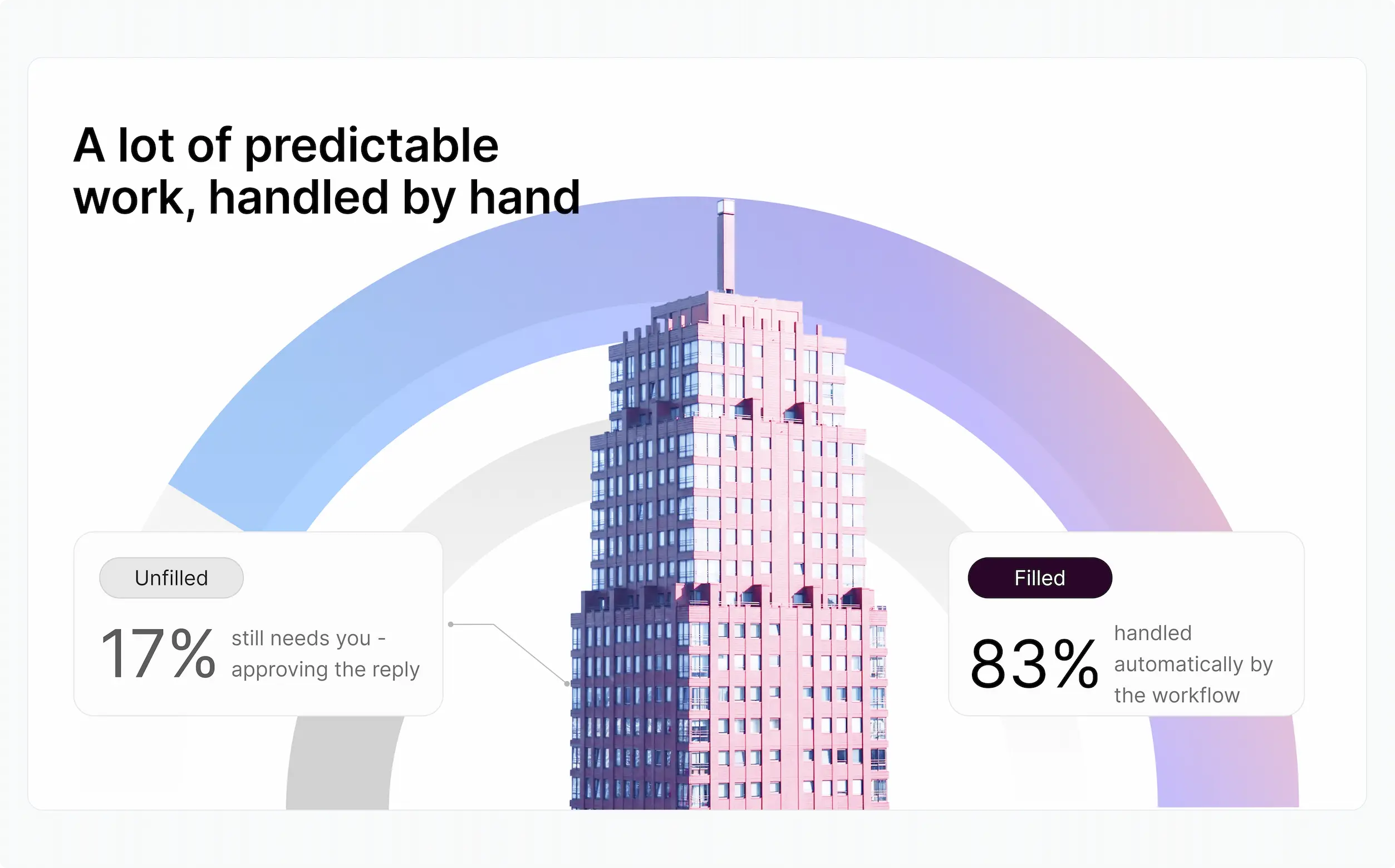
83% of the steps in a routine document request are predictable — yet property managers were doing all of them manually, every time. Read the message, work out what’s needed, create a task, assign it, write a reply, send it. Six steps, repeated hundreds of times a week across the team.
The product opportunity wasn’t building smarter AI — it was designing an interface that let property managers confidently delegate predictable work to automation while staying in control of what actually matters: the outcomes that reach tenants. Trust, not just efficiency, was the design problem.
My Role
I led the end-to-end design of the Reltix workflow automation system — from problem framing and user research through to the full interaction model, key screens, and AI transparency layer.
– Defined the two-user model: property managers (speed + confidence) and operations leads (standardisation + control).
– Designed the workflow builder as a linear step list — not a node canvas — making it approachable for non-technical users from day one.
– Established the AI visual language: one consistent purple badge for every AI-powered step or output across the entire product.
– Designed the “AI proposes, person confirms” interaction model — no AI output executes without explicit human approval.
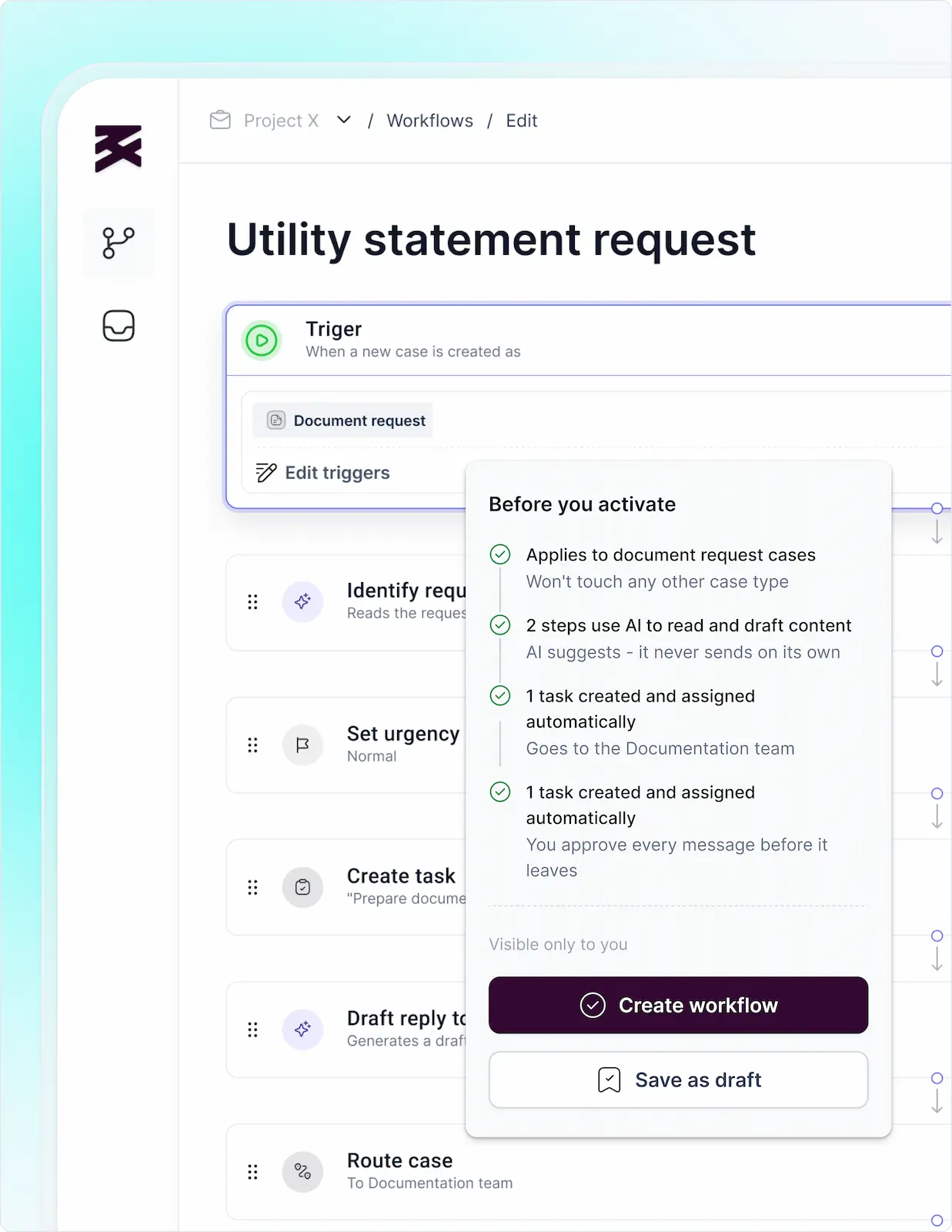
– Created the plain-language activation summary — so turning on a workflow is an informed decision, not a leap of faith.
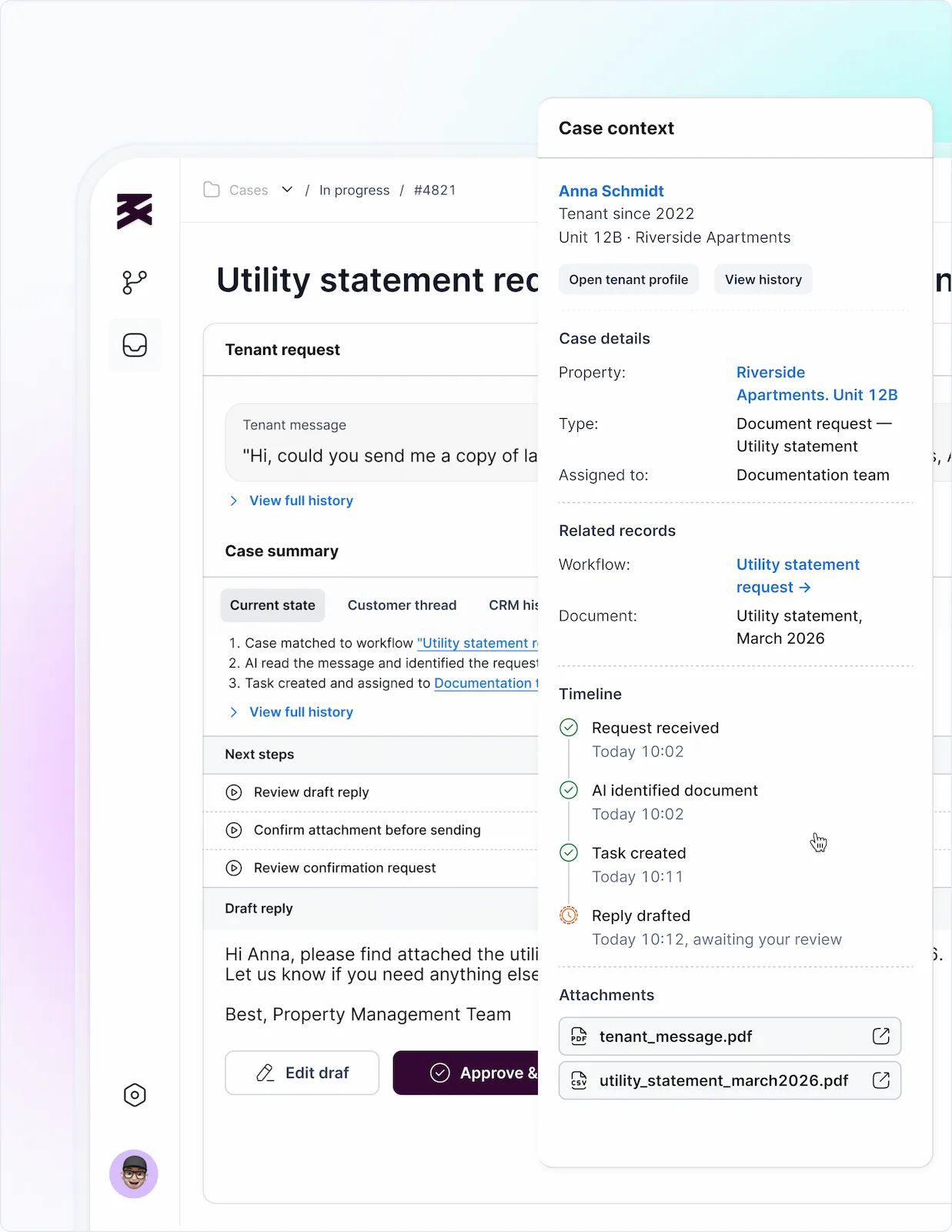
– Designed the case timeline and context panel — giving managers full visibility into what the automation did on their behalf.
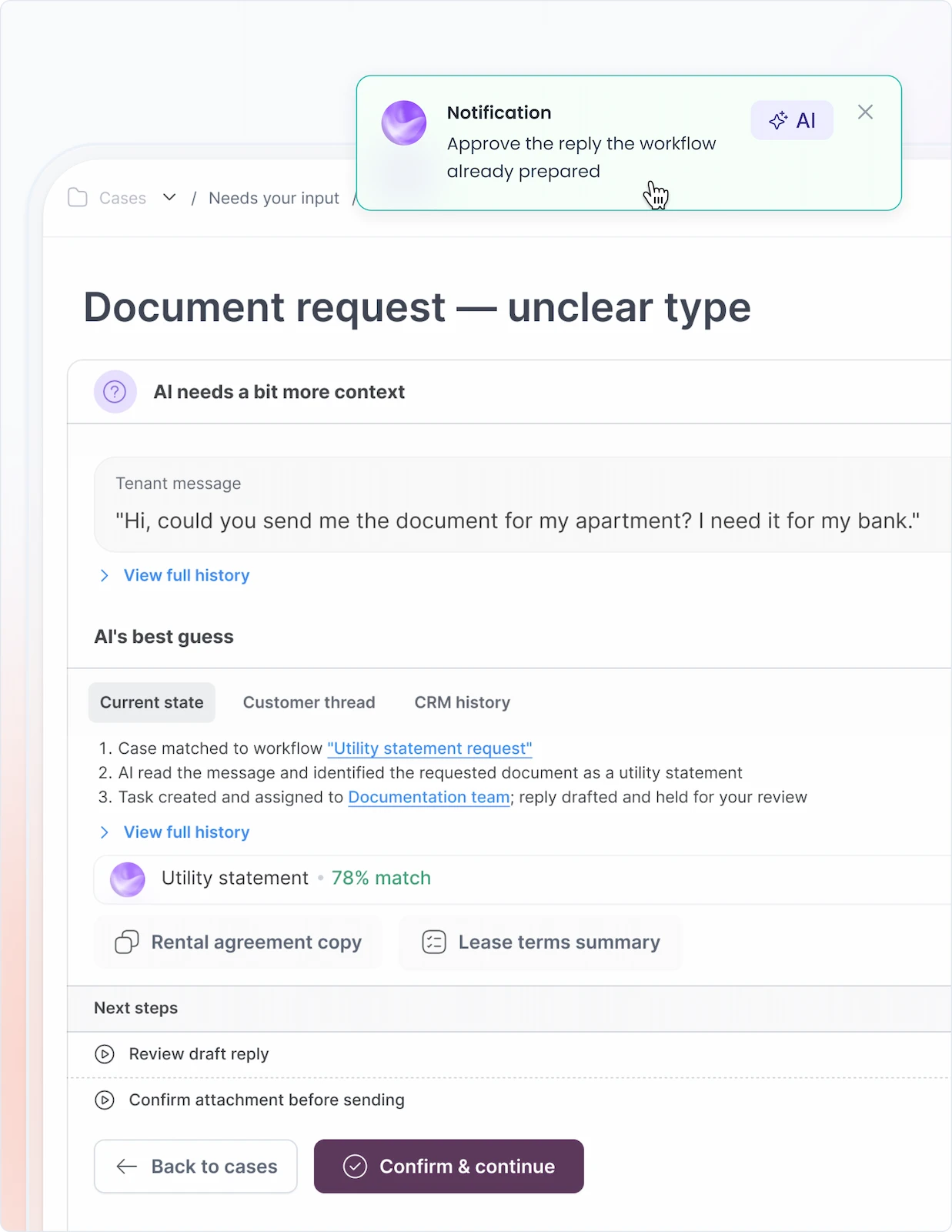
– Solved the AI uncertainty state — when AI isn’t sure, it shows confidence and asks, instead of guessing silently.
– Designed the organisation-wide vs. personal workflow scope model — enabling ops leads to enforce standards without changing the manager’s interaction model.
Impact
“The hardest part of agentic UX isn’t making AI work — it’s making people believe it will. Trust is a design problem, not an engineering one.”
Key Screens
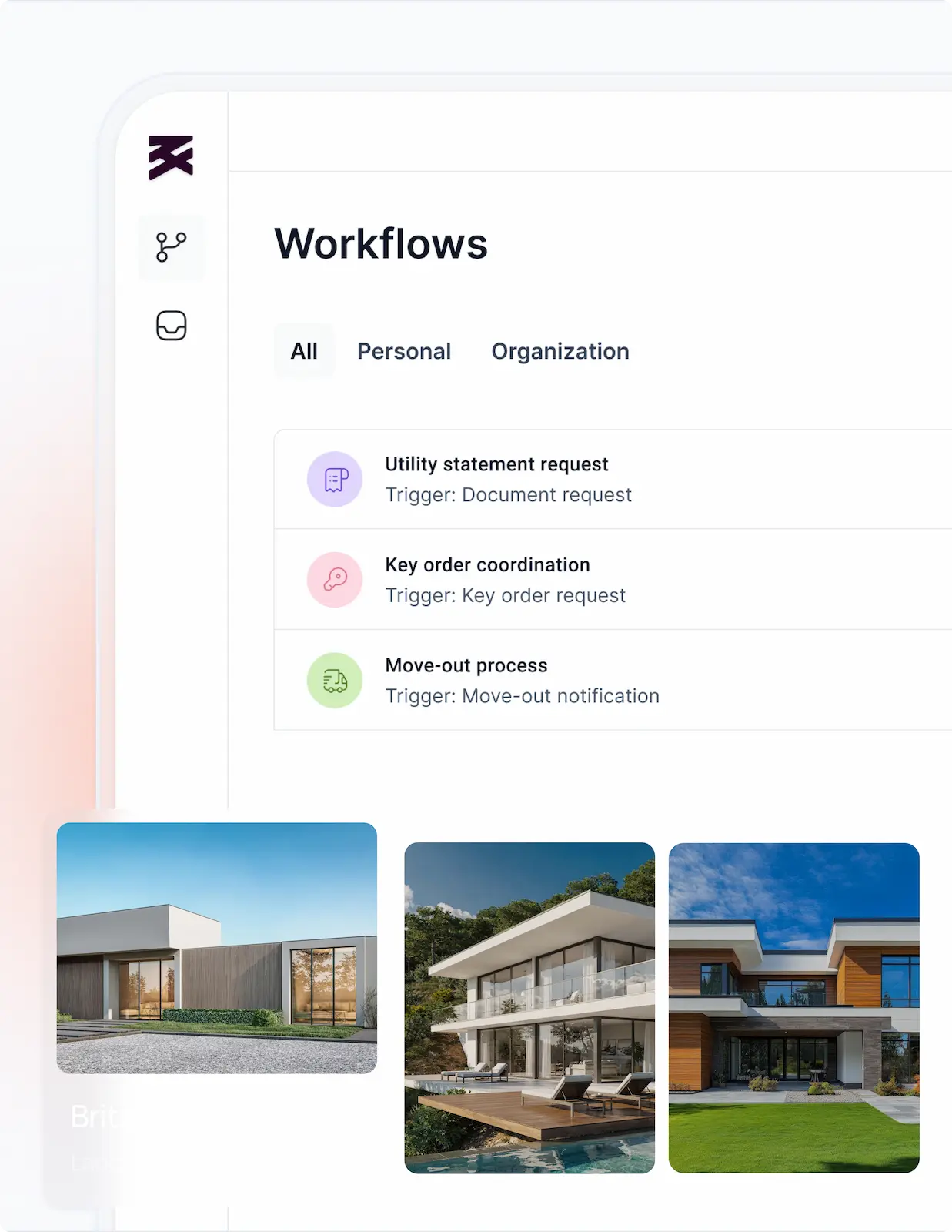
Workflow Management
- Workflows dashboard — trigger, scope, AI flag, status at a glance
- Workflow builder — linear step list with AI steps highlighted
- Activation summary — plain-language, before going live
- Personal vs. organisation scope toggle
Goal: make every workflow discoverable, understandable, and trustworthy before activation.
Case Execution
- Case view — what the workflow did, step by step
- AI-drafted reply — held for approval before sending
- Case context panel — tenant, property, history in one glance
- AI uncertainty state — confidence shown, alternatives offered
Goal: give managers full visibility into what AI did — and a clear path to approve or override.
Process
Discovery — Understanding the Real Problem
I started by mapping the full case lifecycle for routine requests — not the happy path, but the full operational reality. The finding was clear: the problem wasn’t missing features, it was missing trust. Property managers didn’t resist automation because it was too complex to configure — they resisted it because they couldn’t see what it would do, couldn’t tell when AI was involved, and couldn’t verify outcomes without re-doing the work themselves. Efficiency was secondary. Trust was the prerequisite.
Design Decision 1 — Linear Steps, Not a Node Canvas
Tools like n8n or Make use a free-form node graph — powerful, but built for developers. Since the scope focused on predictable, largely linear processes and non-technical users, I chose a vertical list of ordered steps. It communicates the same workflow logic without the learning curve of a canvas, and reads like a checklist — the mental model property managers already use for routine work.
Design Decision 2 — One Colour Means AI, Everywhere
Every AI-powered step or output carries a consistent purple badge — in the builder, in a live case, in a confirmation screen. One signal, learned once, recognised anywhere in the product. Users never have to wonder whether they’re looking at a fixed rule or an AI action. The visual language does the work, silently, on every screen.
Design Decision 3 — AI Proposes, Person Confirms
No AI output — a drafted reply, a guessed document type — sends or executes on its own. Every AI action is held for a person to approve first. This single constraint is what makes the system trustworthy rather than risky. Managers stay in control of every outcome that leaves the platform, while the automation handles everything that comes before.
Design Decision 4 — Plain-Language Summary Before Activation
Before a workflow can be turned on, the builder presents an exact plain-language summary of what will happen: “2 steps use AI to read and draft content. AI suggests — it never sends on its own. 1 task created and assigned automatically.” Turning it on becomes an informed choice, not a leap of faith. This was the single most important trust mechanism in the entire system.
Design Decision 5 — When AI Isn’t Sure, It Asks
A free-form request without a clear document type is a real scenario: a tenant asking for “the document for my apartment.” Instead of guessing silently and potentially sending the wrong thing, the AI shows its best guess with a confidence percentage and offers alternatives — nothing executes until a person confirms. This state, where automation acknowledges uncertainty rather than hiding it, is where user trust is either built or permanently broken.
Outcome & Reflection
This project sits at the centre of what I believe is the most important design problem in enterprise software right now: how do you give non-technical users the benefits of AI automation without making them feel like they’ve handed over control? The answer isn’t smarter AI — it’s a clearer interface.
Every decision in this project came back to the same test: does this make the user more confident, or less? The purple badge, the plain-language summary, the approval gate, the timeline — each one is a trust mechanism dressed as a UI pattern. The measure of success isn’t how much the workflow does. It’s whether the manager can explain to a tenant exactly what happened and why — without opening the system to check.