4 min
5 UX Patterns Every Enterprise AI Product Needs to Earn User Trust
Enterprise users don’t resist AI because it’s too powerful or too complex. They resist it because they can’t see what it’s doing. In consumer products, users tolerate opacity — a recommendation algorithm they can’t explain, a feed they didn’t choose. In enterprise products, opacity is a dealbreaker. The stakes are different. Actions have business consequences. Someone is accountable for what the system does.
I have designed AI-powered features across B2B SaaS products in healthcare, e-commerce intelligence, ERP, and workflow automation. The same resistance appears every time: not to the AI itself, but to the experience of using it. When you fix the experience, adoption follows. Here are five patterns that consistently move the needle.
“Enterprise users don’t resist automation because it’s too complex to configure. They resist it because they can’t see what it will do — and in a business context, that is a reasonable objection.”
Pattern 1 — Planning visibility
What it is
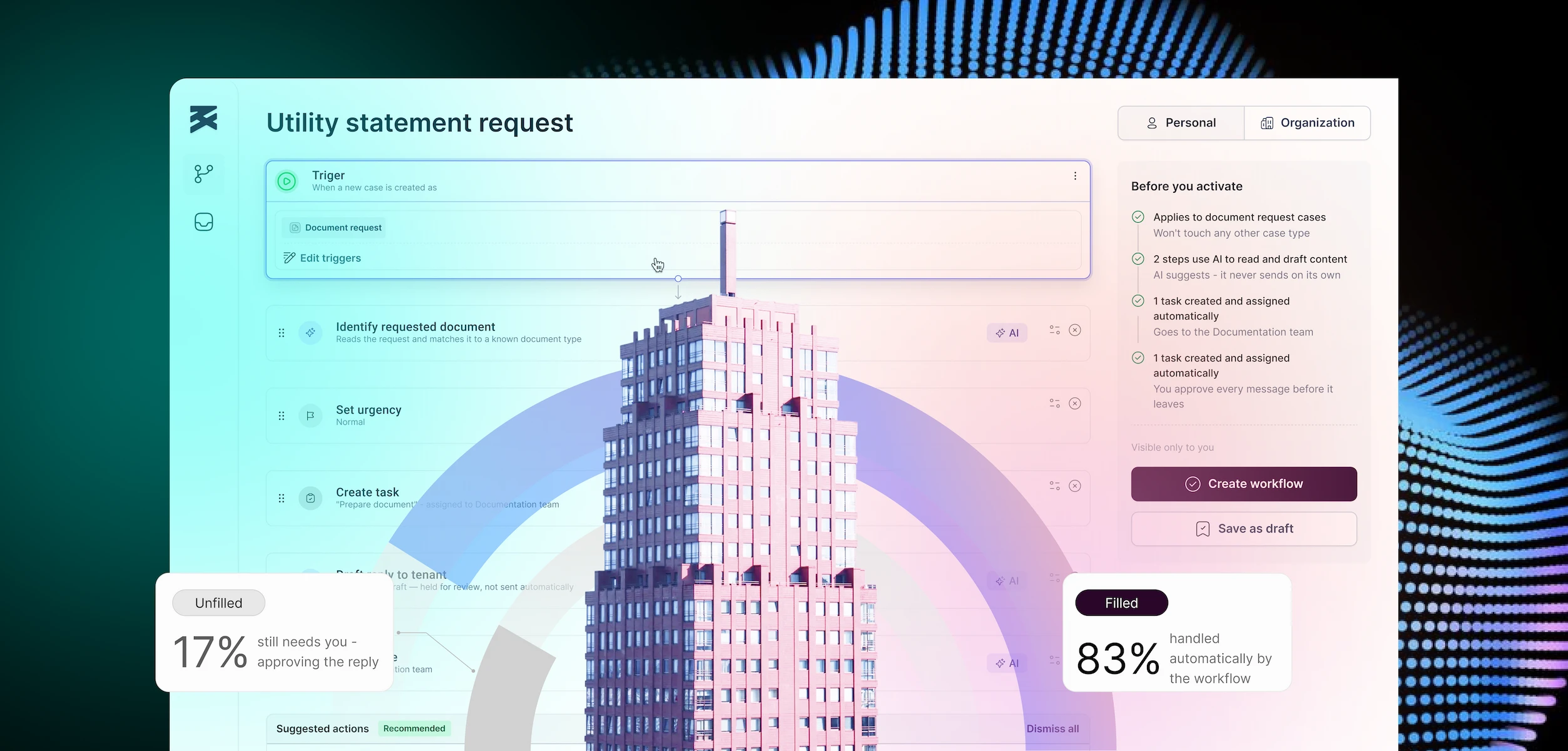
Before the AI acts, it shows the user what it intends to do. Not a technical log. A plain-language summary: “This workflow will read the request, identify the document type, create a task for the documentation team, and draft a reply for your approval.” The user sees the action plan before execution begins.
Why it matters
Users who see the plan before it runs are far more likely to activate automation than users who have to trust a black box. The planning summary is not a UX nicety — it is the mechanism that converts sceptics into users. In every AI product I have designed, adding a pre-activation summary has been the single highest-leverage change for adoption.
Pattern 2 — Consistent AI signal
What it is
Every AI-generated output — a drafted reply, a classification, a suggested action — carries the same visual marker throughout the product. One colour, one badge, one icon. Learned once, recognised everywhere: in the builder, in the case view, in the notification, in the confirmation screen.
Why it matters
Cognitive load in enterprise tools is already high. Users are context-switching constantly. The moment they have to decode whether an output came from a fixed rule, an AI model, or a colleague, you’ve introduced friction that accumulates into distrust. One consistent AI signal removes that question entirely. The visual language does the governance work so the user doesn’t have to.
Pattern 3 — Approval gates, not passive notifications
What it is
AI-generated outputs that have business consequences — replies to customers, task assignments, document sends — are held for explicit human approval before execution. The user is not notified after the fact. They are prompted to approve before anything happens.
Why it matters
This is the non-negotiable pattern. Without it, every AI error is irreversible, and users know it. With it, the AI can be wrong — occasionally — and the system still works, because a human catches it before it matters. The approval gate is not a limitation of the AI. It is the design decision that makes the system safe to deploy in contexts where errors have consequences.
“The approval gate is not a limitation of the AI. It is what makes the system trustworthy enough to actually use in a business context.”
Pattern 4 — Transparent uncertainty
What it is
When the AI is not confident in a classification or decision, it says so. It shows its best guess, its confidence level, and alternatives. “Utility statement — 78% match. Alternatives: Rental agreement, Lease summary.” Nothing proceeds until the user selects or confirms.
Why it matters
This is counterintuitive: acknowledging uncertainty makes AI more trustworthy, not less. Users who see the system admit “I’m not sure” are significantly more likely to trust it when it is confident. Hiding uncertainty to appear more capable is the fastest way to destroy trust when the hidden failure eventually surfaces — and it always does.
Pattern 5 — The audit trail as interface
What it is
Every AI action is visible in a persistent timeline: what happened, when, in what order, and whether a human reviewed it. Not a backend log visible only to admins — a timeline embedded in the primary interface, readable by the user who is responsible for the case or task.
Why it matters
In enterprise contexts, accountability matters. Someone is always responsible for an outcome. When the AI has been involved, that person needs to be able to explain what happened — to a manager, to a client, to a regulator. The audit trail makes the AI’s actions legible and defensible without requiring the user to open a separate system or ask engineering to run a query.
In one product I worked on, the case timeline was the feature that finally convinced a sceptical operations team to activate automation. They didn’t need the AI to be perfect. They needed to be able to see what it had done and verify it. The timeline gave them that. Adoption followed within the first week.
These patterns are not optional
Each of these five patterns — planning visibility, consistent AI signal, approval gates, transparent uncertainty, audit trail — addresses the same underlying problem: the gap between what the AI does and what the user can see. Close that gap, and users adopt automation. Leave it open, and they work around it.
The AI in your product is probably good enough. The question worth asking is whether the interface around it gives users the visibility, control, and accountability they need to trust it with real work. If the answer is no, start with these five patterns. The adoption will follow.
